New Invite Students Workflow Saved CS Team 40 hrs/week
And achieved a 90% adoption rate
This workflow combined student onboarding and license provisioning, minimizing errors and empowering students to have day-one access to courseware.
To equip students to access their courseware in TestOut’s LabSim platform, K-12 instructors had to complete two separate tasks: adding students to their class, and assigning a license to each student. Due to poor system communication — failure to surface errors, and inadequate notification of required actions — many instructors eventually resorted to calling TestOut’s Customer Success (CS) team for help, increasing the team’s workload during their busiest times of the year.
I partnered with Product Management and Engineering to create a workflow that combined the two processes, and clarified system communication. With this change, teachers were able to independently enable their students to start coursework on the first day of class, reducing user frustration, and subsequent calls to Customer Success. 90% of instructors chose the new workflow over previous options, saving the CS team 40 hours per week during peak periods.
When it came to onboarding K-12 students, LabSim failed to outline requirements, manage teacher expectations, diagnose and suggest solutions for errors, and adequately communicate when more needed to be done. Because of this, students often didn’t have courseware access on the first day of class, and teachers ended up frustrated, relying on Customer Success for help.
For students to access to their LabSim courseware on the first day of class, teachers needed to complete two tasks:
Adding students to their class by either
Uploading a CSV with students’ names, usernames, and passwords,
Or listing student email addresses in LabSim, so the system could generate email invitations to the students.
Once students had joined the class, instructors needed to assign each student a license for the required courseware.
Unclear communication in the UI, combined with external factors, like school districts blocking outside emails, led to failure at various points, often resulting in calls to the Customer Success team for resolution.
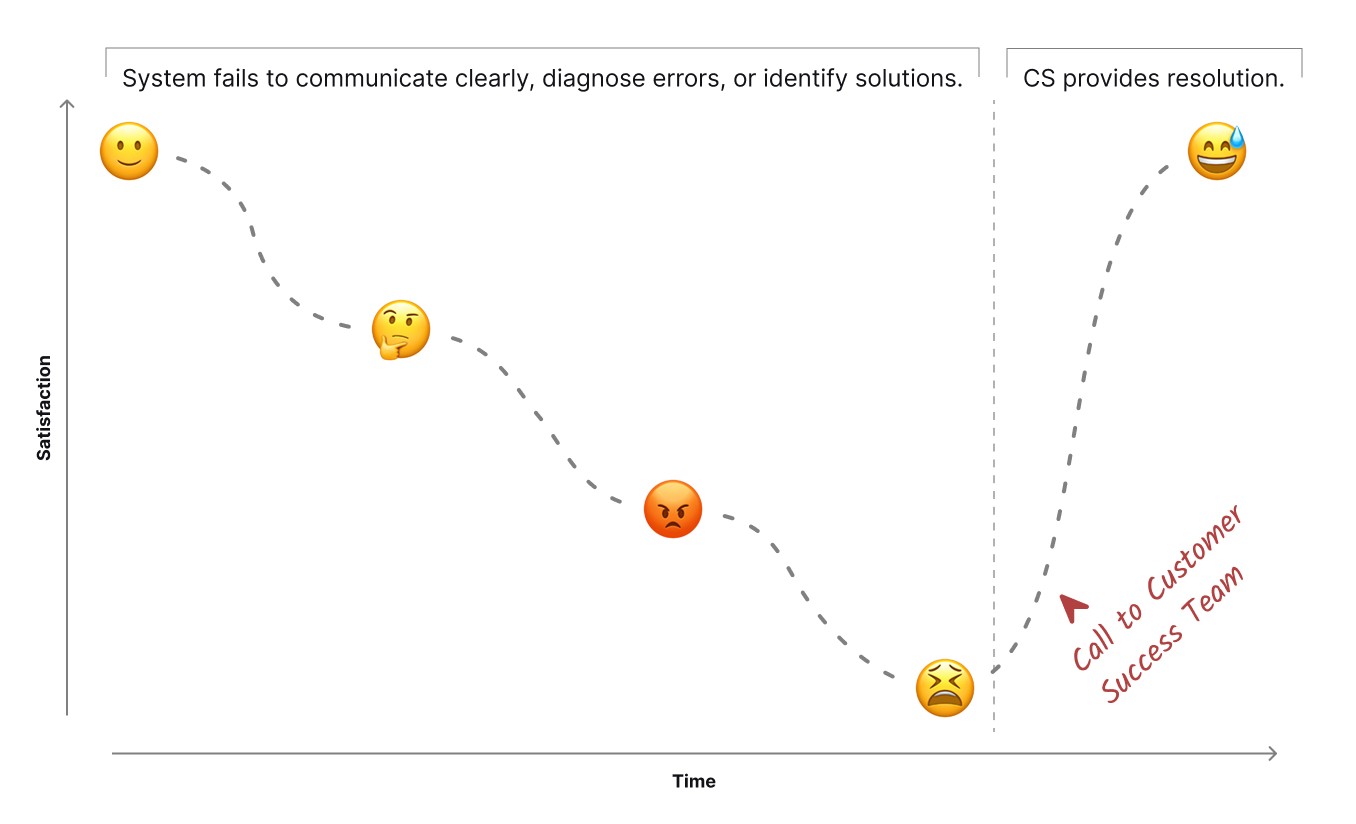
Due to poor system communication and lack of error resolution, customers repeatedly experienced the journey from satisfaction to confusion to frustration to desperation, ultimately leading to a call to customer success for resolution.
Common Pain Points
CSV Upload Errors
Because the system provided inadequate guidance on the platform’s rigid formatting rules, teachers often ran into errors because their files didn’t meet the requirements. When CSVs were formatted incorrectly, the system didn’t adequately communicate the problem or outline potential solutions, leaving instructors confused and frustrated.
The CSV upload process also required instructors to create passwords for their students, introducing a security vulnerability. Many instructors, faced with creating passwords for several students, simply assigned the same password to all students.
System-Generated Email Problems
The alternative to uploading a CSV was for LabSim to send invitation emails to students. This process was simpler, and avoided the security risk of teachers creating their students’ passwords. However, it also had inherent challenges.
Many school districts block incoming emails from outside domains. Emails sent from LabSim fell into this category. When invites got blocked by the district, the system didn’t alert teachers to that fact. This resulted in an unpleasant surprise on the first day of class, when teachers found they had no students enrolled in LabSim.
Failure to Assign Licenses
Once students were added to the class, a K-12 instructor’s work wasn’t done. But LabSim didn’t adequately inform teachers that another process was required for students to access courseware: assigning licenses. The system placed that onus on the students. This worked for university students, but not for K-12 students, who didn’t purchase their own licenses.
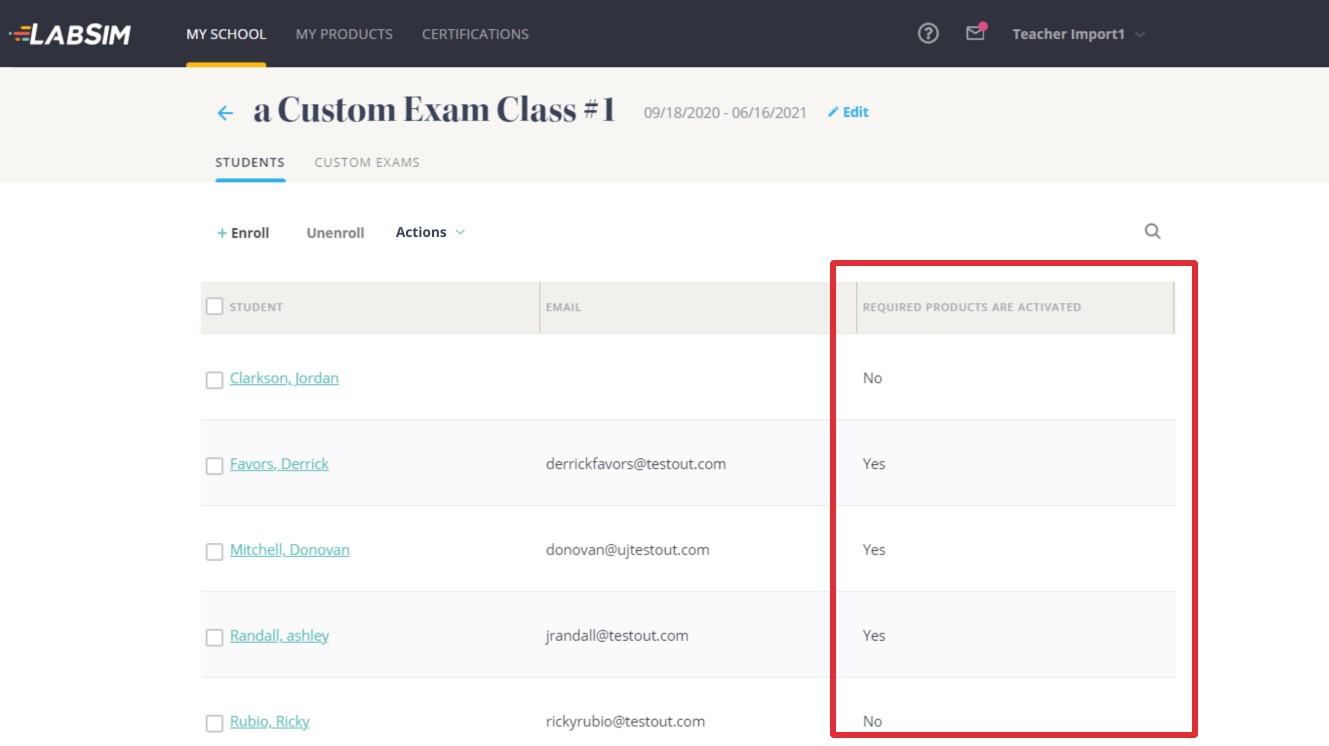
The old UI showed which students had licenses and which did not, but it failed to highlight to instructors the necessity of providing courseware access to their students.
If the teacher had added their students by uploading a CSV, they could immediately assign licenses, but the UI made that requirement easy to overlook. In the case of sending email invites via LabSim, teachers had to wait until students joined the class before they could assign licenses, making this step easy to forget. In either case, teachers commonly arrived at the first day of class thinking they’d done due diligence, only to find that the students didn’t have access to their courseware.
As a result…
These situations led to stress and frustration for teachers. Feeling like they had no other option, instructors often called Customer Success for resolution. This required significant time from the CS team at the start of each semester, when their workload was heaviest.
Our goals for this project were two-fold, focused on advancing business goals as well as addressing customer pain points:
Reduce the workload of the CS team, allowing them to focus on higher priorities. This supported a business initiative of decreasing administrative overhead company-wide.
Improve the teachers’ experience getting their classes underway each semester, reducing their pain and frustration, and facilitating day-one access to courseware for their students.

Complex enrollment requirements, and limited platform feedback were unintentionally increasing instructors’ already heavy workloads at the start of each semester. This led to an increased workload for TestOut's Customer Success team as they dealt with the resulting calls for help.
To accomplish our goals, we created a new user flow that addressed the pain points listed above. It improved communication, and ensured completion of both required processes — adding students to a class, and assigning them licenses — by combining them into one workflow. This allowed instructors to have their students ready on day one, without requiring help from Customer Success.
Clear Flows and Instructions
The first step in the new process set expectations by communicating requirements for adding students and assigning licenses. It clarified the process and outcomes, so teachers knew what to expect.
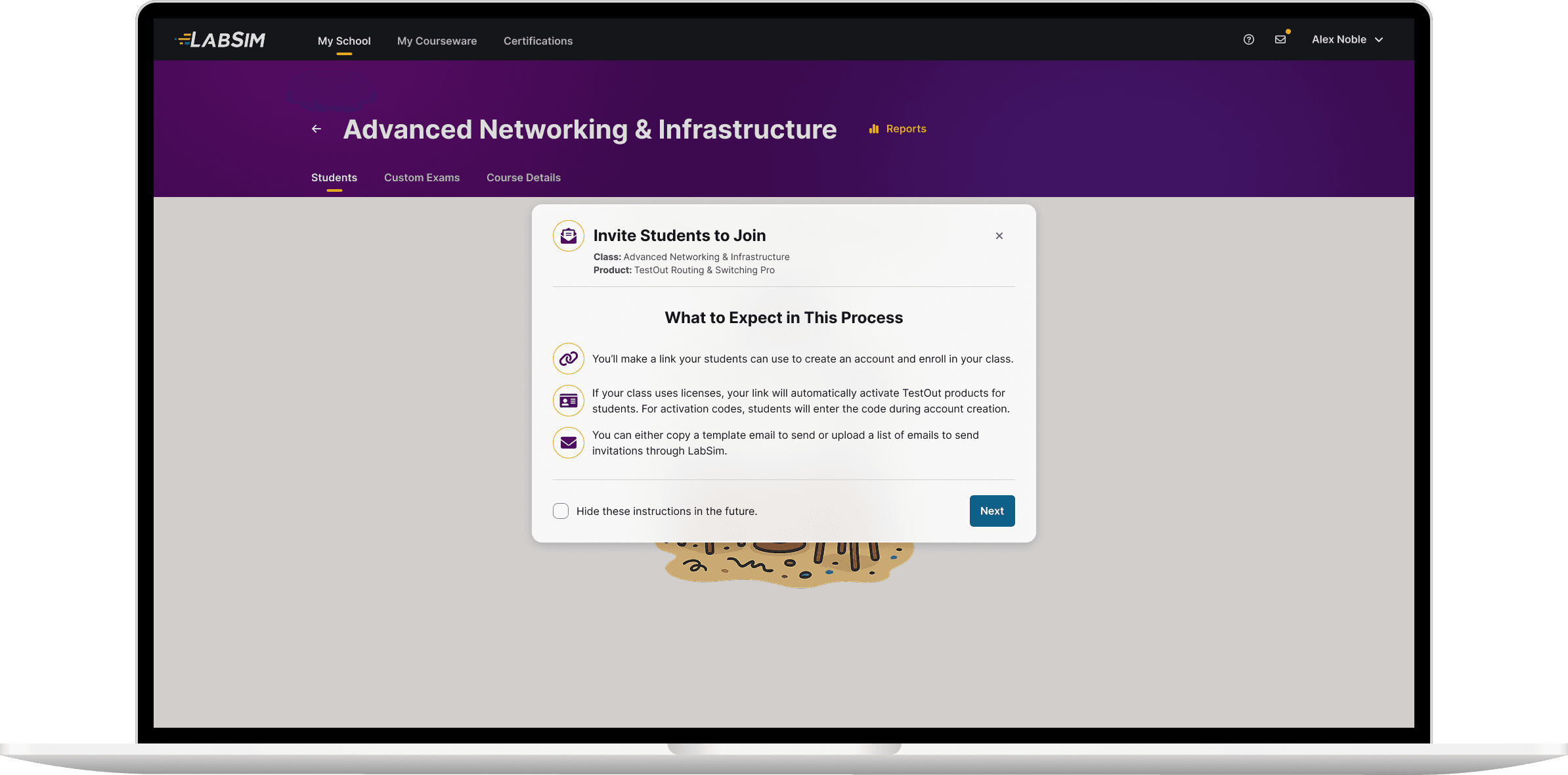
The first step in the new process set expectations, clarified the process, and defined outcomes.
Eliminating the CSV Upload
Previously, the most common onboarding errors stemmed from CSV uploads. The new solution eliminated the need for CSVs entirely, preventing those errors (and the resulting calls to Customer Success). This saved teachers the time and frustration of creating a properly formatted file, and removed a key security risk, since the old CSV workflow was the only process that required teachers to generate passwords for their students.
Providing an Email Template
The new workflow also addressed the problem of school districts blocking emails from LabSim. It allowed teachers to copy and paste an invitation email template, and send it to students themselves. Because instructors sent the invitations themselves, they knew when the messages were sent, and would be notified if a message was not delivered.
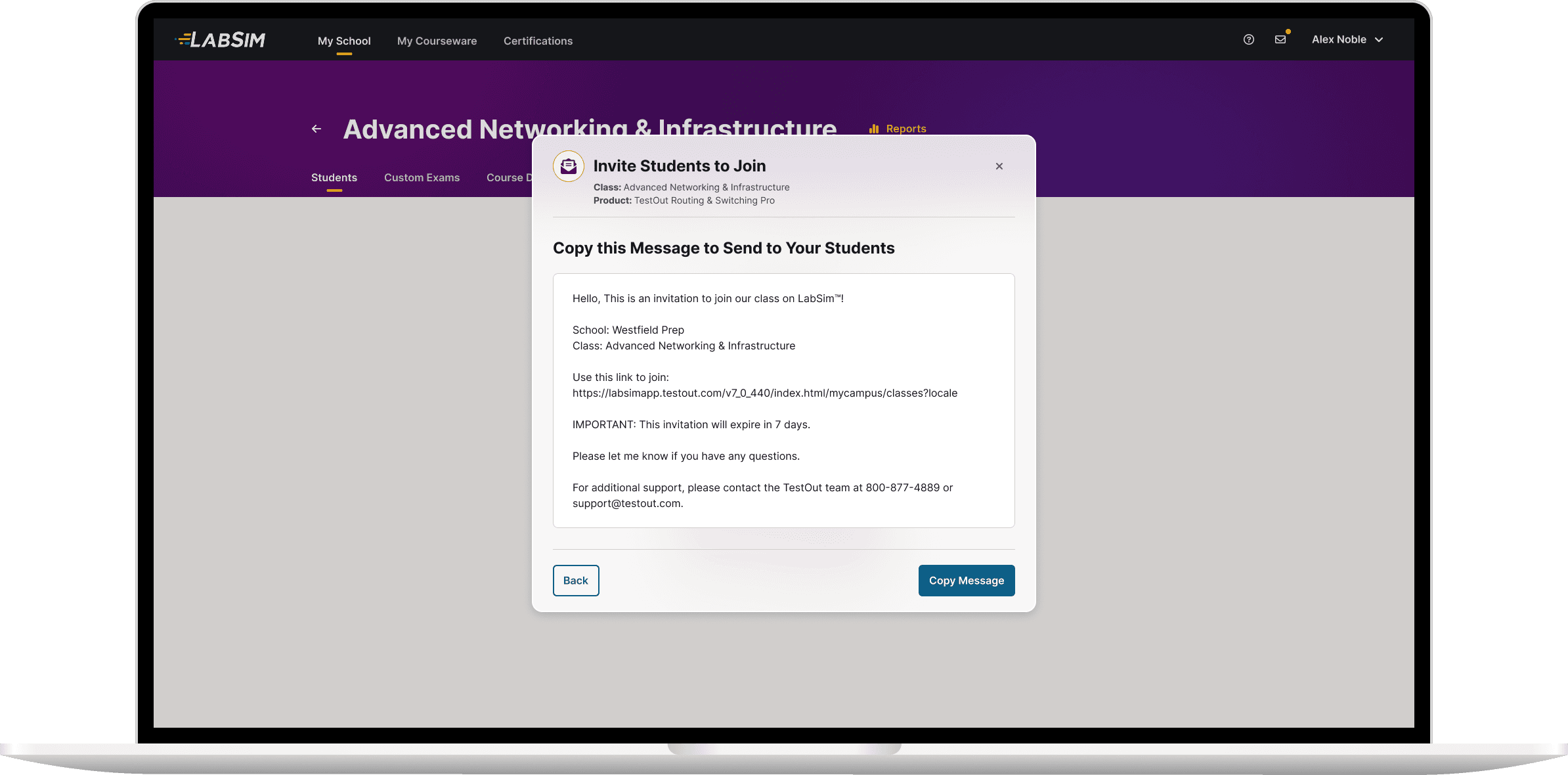
Because some districts block emails from outside domains, our solution allowed teachers to copy a message to send to students themselves.
Combining Both Processes
The processes of adding students to a class and assigning them licenses were both required for students to start their coursework on day one. Our new solution combined these steps into one workflow, eliminating the previously common failure to assign licenses.
To do this, we introduced a new feature in LabSim: license reservation. Previously, students had to join a class before their teacher could assign them a license. The new process allowed instructors to reserve licenses for their class, at the same time as sending invitations to join the class. As soon as a student joined the class, one of the reserved licenses was automatically assigned to them. Unused licenses were returned to the school’s license pool 7 days after the invitations were sent.
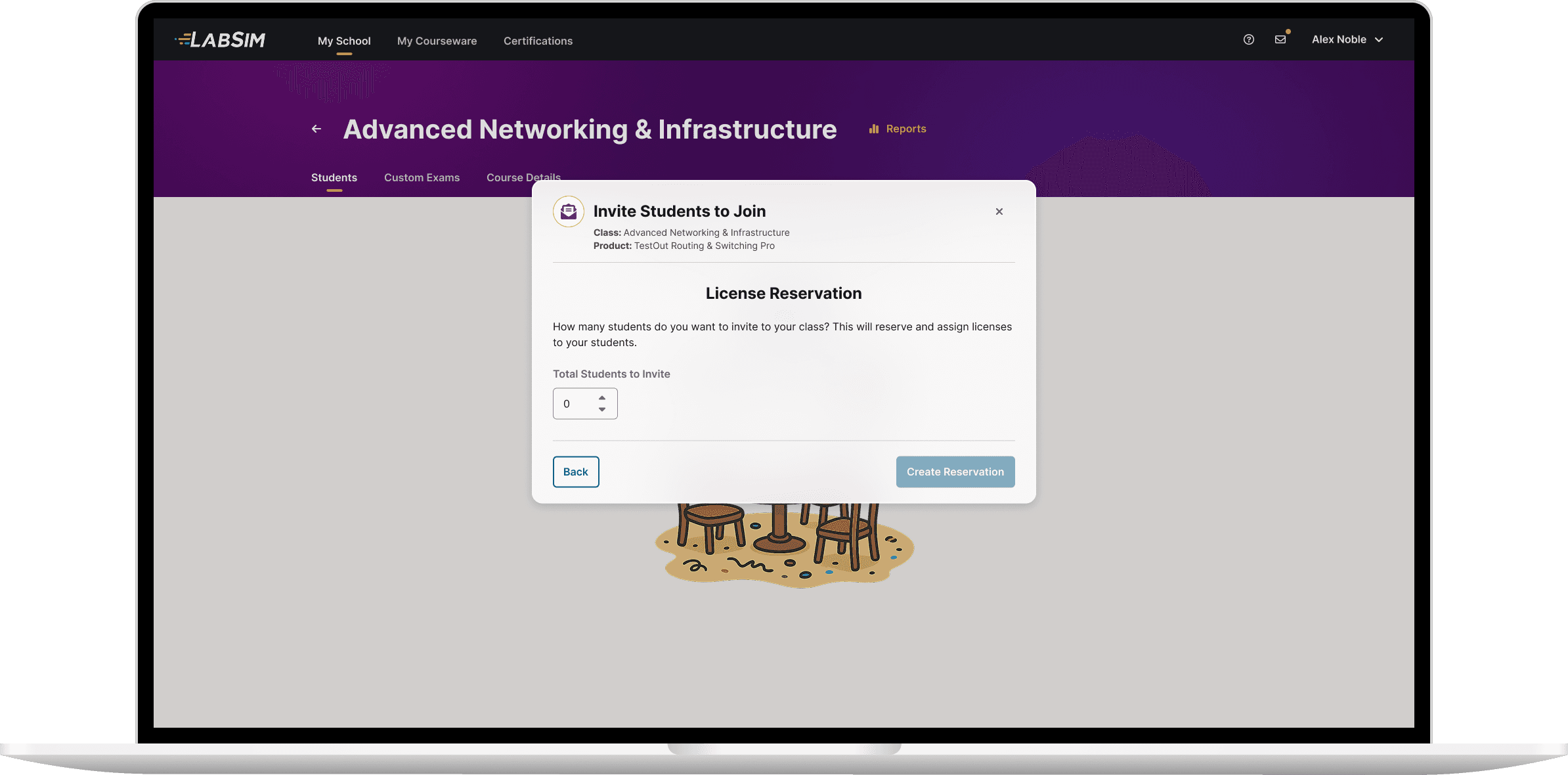
We introduced the ability to reserve licenses. This new feature allowed us to combine the two previously separate processes — adding students to a class and assigning licenses.
Summary
This end-to-end solution resolved the challenges endemic in both previous methods for adding students to a class, and combined two required processes, allowing teachers to empower their students to start coursework on day one, without needing to call Customer Success.
When we were ready for release, because the new workflow addressed the issues inherent in the legacy methods, I advocated replacing them. However, to avoid disrupting teachers who were accustomed to the existing options, we chose to keep them and introduce the new workflow as a third alternative.
This resulted in an A/B/C test, in which 90% of instructors chose the new workflow over the two older options, demonstrating a strong preference for the improved approach.
After release, based on feedback from instructors, we added the ability to edit a license reservation, extending the expiration date and/or adjusting the number of licenses reserved.
If a class didn’t consume all of their reserved licenses, unused licenses needed to be made available to other instructors. License reservations were originally set to expire 7 days after the invitation link was created. However, this didn’t account for the inevitable add/drop fluctuations at the start of each semester. By introducing an editable expiration date, along with the ability to modify the number of reserved licenses, instructors could adapt to class changes as they occurred.
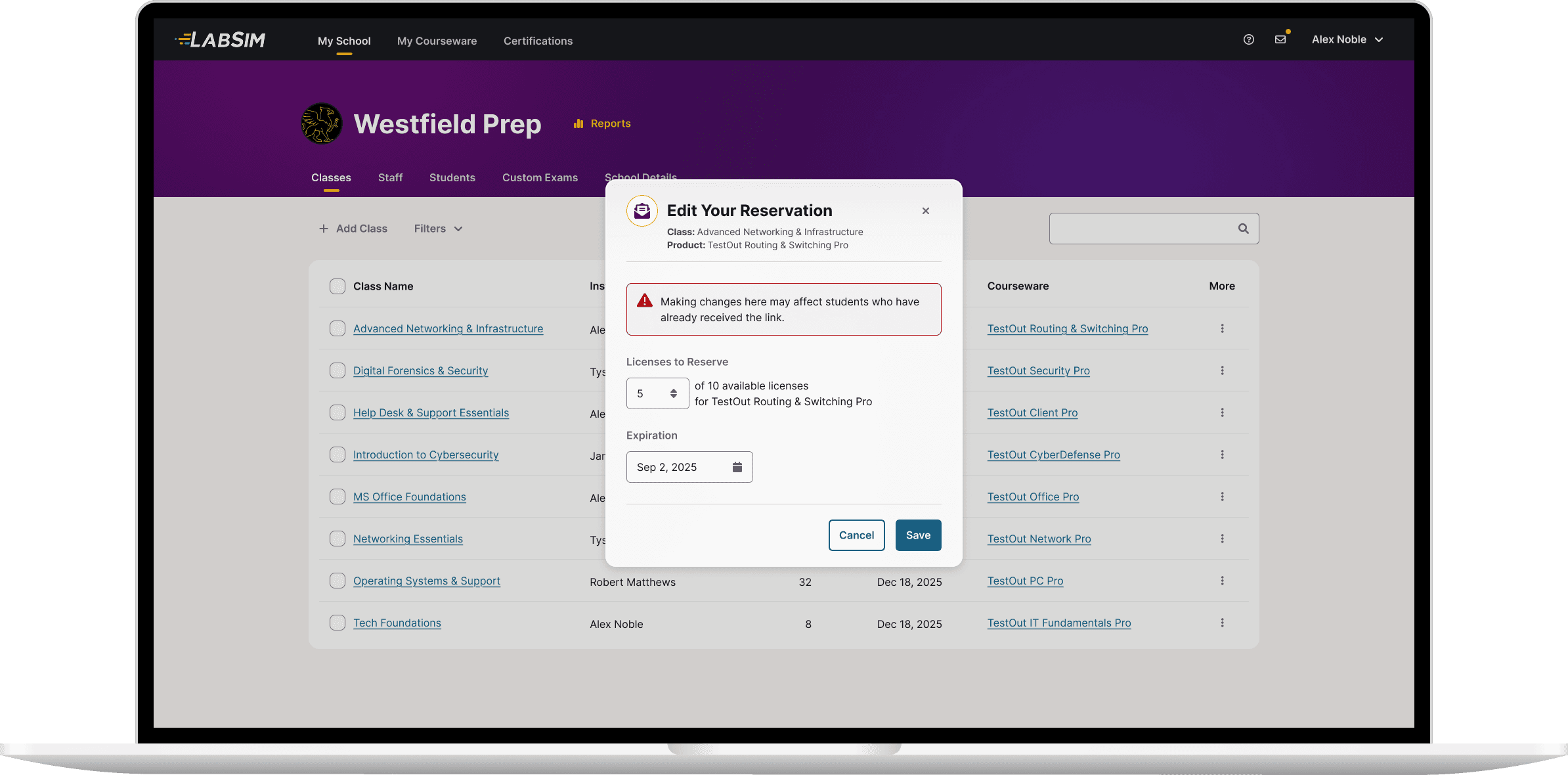
In response to instructor feedback, we added the ability to edit the number of licenses reserved and the date the reservation would expire.
The new solution exceeded our goals of improving the teachers’ experience, and reducing the workload of the CS team.
90% of instructors adopted the new method for adding students.
The reduced number of calls saved 40 hours per week for the Customer Success team during their busiest times of the year.
We alleviated teacher frustration, and increased satisfaction and confidence in providing their students with day-one courseware access.
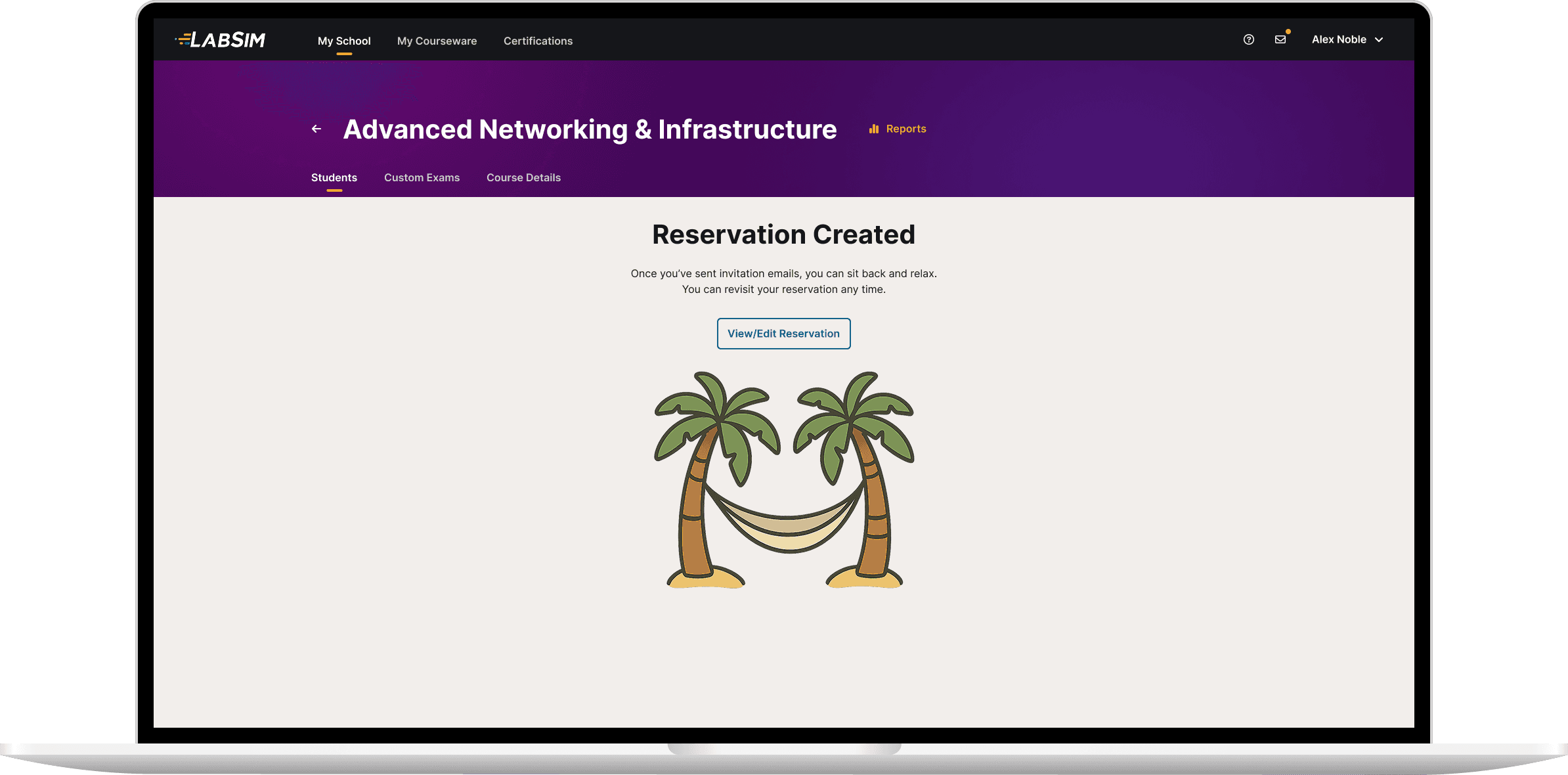
The new workflow helped users avoid errors common in previous approaches. And, by combining two previously separate processes, it allowed K-12 teachers to have their students ready to start their coursework on the first day of class.